StandaloneStack – Add Mac-Like Dock To Windows 7 Taskbar + 1 |

| StandaloneStack – Add Mac-Like Dock To Windows 7 Taskbar Posted: 25 Mar 2012 12:19 AM PDT
Windows 7 users can now add Mac style Dock setting using StandaloneStack.Standalone Stack is a freeware that can launch any folder in Mac-style popup icon stacks that appear when you click on a shortcut and fade out when you move or click away. Supports two styles of icons: "grid" and "fan". Always try to make your Windows as unique as possible. This will create a pleasant working environment. How to Use “StandaloneStack”? 1. StandaloneStack is a portable application and no installation is needed. You can just run the .exe and in option window. 2. Now one can create a new stack. As I have shown screenshot below, 3. Once you given stack name and set path. Then click create stack. A shortcut will be created as shown below, 4. Just Pin this shortcut on Windows 7 taskbar. Tha’s it Downlaod: StandaloneStack for Xp and Windows 7        |
| Bitdefender Sphere For Your AllRound Internet Security Posted: 24 Mar 2012 11:11 PM PDT
Bitdefender being the top rank in virus protection launched new software to protect you from and block internet threats. This anti software launched is Sphere Security Suite. It can be used in computers, smartphones, Macs, tablets. This integrated security system includes several parts like:
In short Bitdefender Sphere is a complete security suite which provides complete protection to your system from online threats.
    |
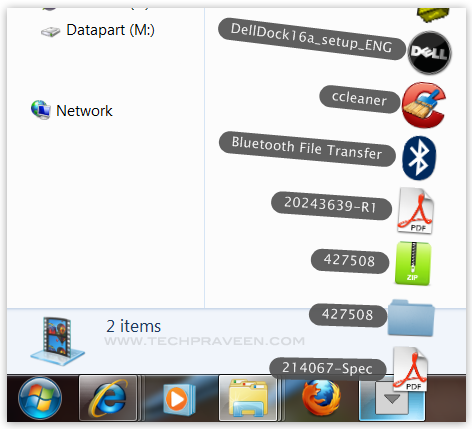
 Note that this program is based on "Stacks Docklet", which is an add-on developed for Mac-Style Windows' docking launchers such as "RocketDock", "RK Launcher", and Y's Dock, but has been adapted to work from the desktop environment using simple shortcuts.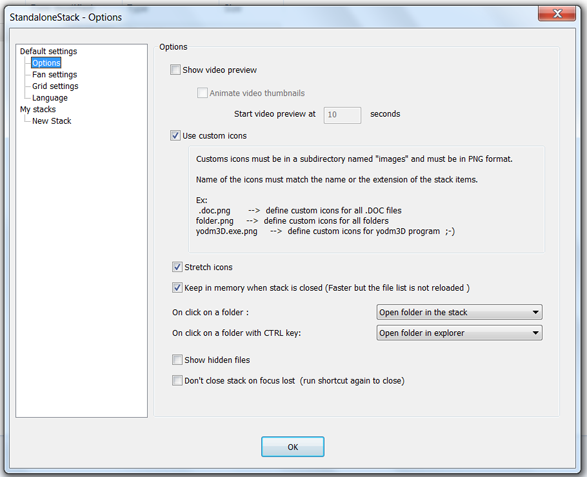
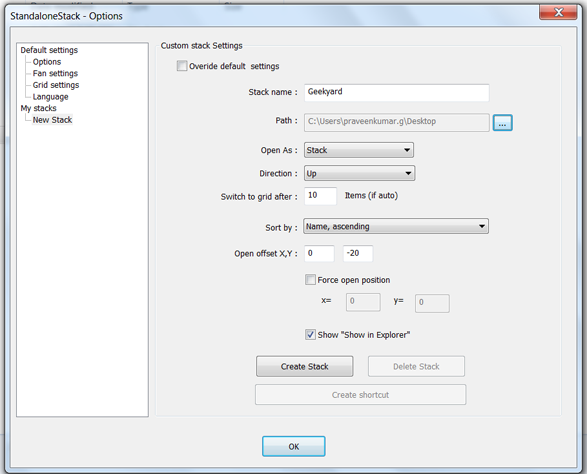

 you are done.
| You are subscribed to email updates from Computer Tips & Tricks To stop receiving these emails, you may unsubscribe now. | Email delivery powered by Google |
| Google Inc., 20 West Kinzie, Chicago IL USA 60610 | |

Niciun comentariu:
Trimiteți un comentariu